Draw Lines
The Line control draws a line in a specified direction, style, width, and color. You can use it to decorate and visually separate a report’s sections.
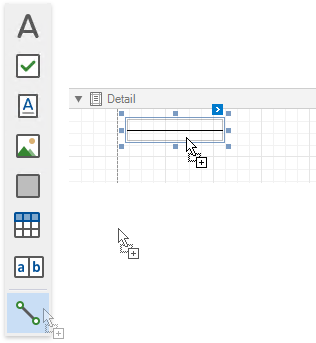
To add a line to a report, drag the Line item from the Toolbox onto the report’s area.
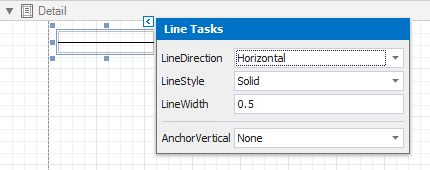
The actions list of the line’s smart tag provides the main control properties:
-
Line Direction
Enables you to draw a line horizontally, vertically, and across the rectangle the line occupies from one corner to another (Horizontal, Vertical, Slant and Back Slant types).

-
Line Style
You can select the solid (by default), dashed, dotted, or mixed line style.

-
Line Width
Specifies the line width in pixels as a floating point value.
-
Anchor Vertically
Specifies the vertical anchoring style, so that after page rendering a control stays attached to the top control, bottom control, or both.
[!Note] The Line control cannot span several bands. See Draw Cross-Band Lines and Boxes to learn about drawing lines through several bands.