Navigation in a Tree List
| Action | Description | |—|—| | Clicking a data cell | Moves focus to the clicked cell. | | ARROW keys | Moves focus to the next cell in the corresponding direction. | | HOME | Moves focus to the first cell within the focused node. | | END | Moves focus to the last cell within the focused node. | | PAGE UP | Moves focus one page up. | | PAGE DOWN | Moves focus one page down. | | CTRL+HOME | Moves focus to the first cell within the first node. | | CTRL+END | Moves focus to the last cell within the last node. | | TAB or CTRL+TAB | Moves focus away from the TreeList to the next control, in tab order. | | SHIFT+TAB | Moves focus away from the TreeList to the previous control, in tab order. | | CTRL+RIGHT ARROW | Expands the focused node. | | CTRL+LEFT ARROW | Collapses the focused node. |
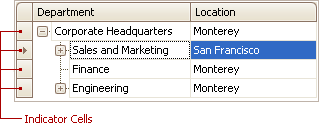
You can also click node indicator cells to move focus to the corresponding row while preserving column focus.