Edit Cells in a Tree List
Activate Cell Editor
Do one of the following:
- Click a cell.
- Focus a cell (for instance, via the keyboard), and press ENTER or F2.
- Focus a cell and press any alpha-numeric key. The editor will be invoked and its contents will be replaced with the pressed character.
Select and Deselect Cell Text
Press F2 or CTRL+A.
Close Cell Editor and Accept Changes Made
Do one of the following:
- Press ENTER.
- Click any other grid cell.
- Focus any other control.
Discard Changes
To discard changes made in a cell, press ESC.
To discard changes made in all cells within a node, press ESC twice.
Open Cell Editor’s Dropdown
Do one of the following:
- Activate a cell editor and press ALT+DOWN ARROW or F4.
-
Click the editor’s dropdown button:
Close Cell Editor’s Dropdown
For all editors providing a dropdown, you can close the dropdown by pressing ALT+DOWN ARROW.
If the calculator is displayed in the dropdown, it can be closed via CTRL+ENTER.
Dropdowns displaying lists of items can be closed by clicking an item with the mouse, or by selecting an item with the keyboard and pressing ENTER.
Change Values
Change Date/Time Values
You can edit these cell values without opening the dropdown calendar. Position the caret at the portion of a date/time value that needs to be changed. To increment the value, press CTRL+UP ARROW. To decrement the value, press CTRL+DOWN ARROW.
Change Numeric Values
To increment the value, press CTRL+UP ARROW. To decrement the value, press CTRL+DOWN ARROW.
Change Values of Cells That Provide Dropdown Items
To select the previous value, press CTRL+UP ARROW. To select the next value, press CTRL+DOWN ARROW.
Note: this feature is not applicable to all editors.
Edit Images
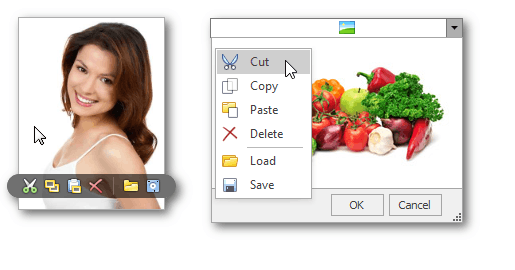
To copy, cut, paste, load and save images in image editors, right click the image and select the required command via the context menu: