Exporting from Print Preview
There are two options available for a document being exported to.
Export Document to a File on Disk
To export a document and save the resulting file on your hard drive, do one of the following.
- On the toolbar, click the arrow near the Export Document… button
 .
. - On the File menu, choose the Export Document… item.
Choose the required format from the invoked list.
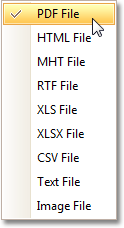
Then, you may be prompted to define format-specific options. See corresponding help topics in this documentation for details, e.g. PDF-Specific Export Options.
Once you’ve specified exporting options, the Save As dialog appears, allowing you to enter the file name. Then, the following message will be invoked.
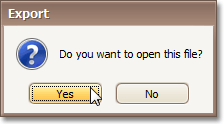
Click Yes, if you want to preview the exported file.
Send Exported File via E-Mail
To send the resulting PDF file via e-mail, do one of the following.
- On the toolbar, click the arrow near the Send via E-Mail… button
 .
. - On the File menu, choose the Send via E-Mail… item.
Choose the required format in the invoked list.
Then, you may be prompted to define format-specific options. See corresponding help topics in this documentation for details, e.g. PDF-Specific Export Options.
Once you’ve specified exporting options, the Save As dialog appears, allowing you to enter the file name.
Finally, the created document will be attached to a new empty message, created in your default mail program.