Select Grid Rows and Cards
Select Individual Rows/Cards
To select a row/card and clear the existing selection, do one of the following:
-
In Grid Views, click the row’s indicator cell or any of its data cells:
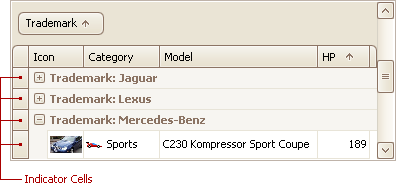
- In Card and Layout Views, click the card’s caption or any of its data cells.
- Select the row/card using the ARROW keys.
Select Multiple Rows or Cards
To select a row/card while preserving the current selection, do one of the following:
- In Grid Views, click the row’s indicator cell or any of its data cells, while holding the CTRL key down.
- In Card and Layout Views, click the card’s caption or any of its data cells, while holding the CTRL key down.
To toggle the focused row’s/card’s selected state, do one of the following:
- Press CTRL+SPACE.
- Click the row/card while holding the CTRL key down.
To move focus between rows and cards while preserving the current selection, use CTRL+ARROW keyboard shortcut (supported by Grid and Card Views).
Select a Range of Rows/Cards
To select all rows/cards, press CTRL+A (supported by Grid and Layout Views). Before pressing this shortcut, ensure that the focused cell is not being edited
To select a continuous range or rows/cards, you can do the following
- Use ARROW, PAGE UP, PAGE DOWN keys while holding the SHIFT key down.
-
To select all rows/cards between the currently focused row/card and another one, click the target row/card while holding the SHIFT key down.
[!NOTE] If the SHIFT key is combined with CTRL, the previously selected rows/cards, if there are any, are not unselected. If you use the SHIFT key alone, the previously selected rows/cards are unselected.
- To select a continuous range of cards in Layout Views, drag with the mouse around cards that are to be selected (marquee selection).
Copy Selected Records to the Clipboard
Press CTRL+C or SHIFT+INS.