Point Labels Page
Tasks
- Resolve overlapping of point labels;
- Customize the appearance of point labels.
Page Elements
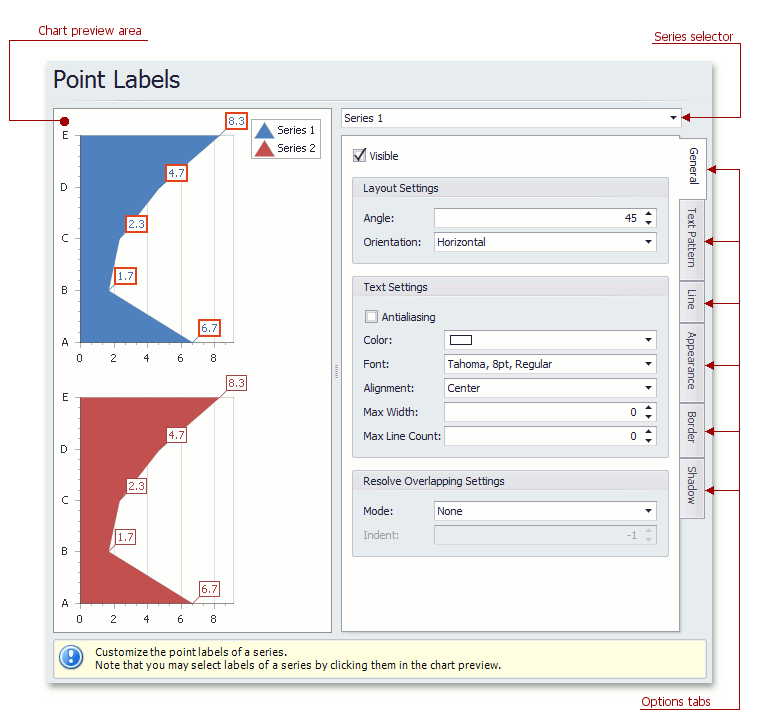
[!NOTE] The point labels are hidden in the chart control by default. To show series point labels, check the Visibile check box.
Chart preview area
Previews a chart’s layout.
Note that you can select point labels to be modified directly in the chart preview area.
Series selector
Specifies a series to be customized.
Options tabs
The following tabs are available on this page.
-
General
Specifies whether labels should be visible and shown for zero values, determines their text and resolves overlapping settings.
-
Text Pattern
Specifies a text pattern to format series point labels.
-
Line
Determines whether label lines should be visible, and specifies their appearance.
-
Appearance
Specifies the background color and fill style of labels.
-
Border
Determines whether label borders should be visible, and defines their color and thickness.
-
Shadow
Specifies whether a label’s shadow should be visible, and defines its color and size.