Annotations Page
Tasks
- Create and customize image and text annotations.
Page Elements
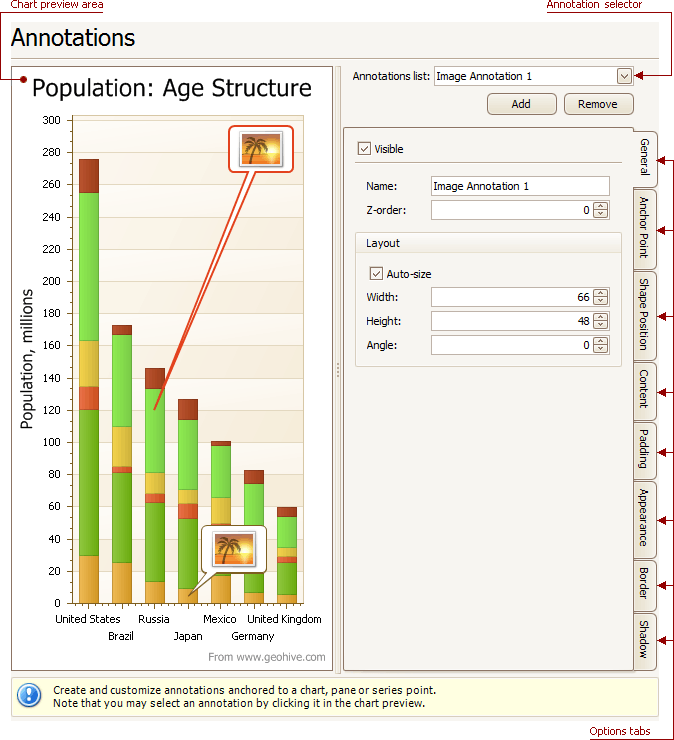
Chart preview area
Previews a chart’s layout.
Annotation selector
Specifies an annotation to be created and/or customized.
Note that you can select an annotation directly on the chart preview area.
Options tabs
The following tabs are available on this page.
-
General
Specify an annotation’s name, adjust its visibility, z-order and layout.
-
Anchor Point
Choose an element to anchor to (chart, pane, or series point), and adjust the corresponding options.
-
Shape Position
Choose an annotation’s shape position type (free or relative), and adjust the corresponding options.
-
Content
Depending on an annotation’s type (text or image), specify its content.
-
Padding
Specify an annotation’s inner indents.
-
Appearance
Adjust an annotation’s background color, fill style, shape and connector options.
-
Border
Specify visibility, color and thickness of an annotation’s borders.
-
Shadow
Specifies visibility, color and size of an annotation’s shadow.