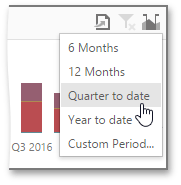
Predefined Periods
The Range Filter dashboard item allows you to add a number of predefined date-time periods that can be used to perform a selection (for instance, year-to-date or quarter-to-date).
Add Predefined Periods
To add predefined ranges, open the Range Filter’s Options menu and go to the Custom Periods section. Click “+” to add a new period.
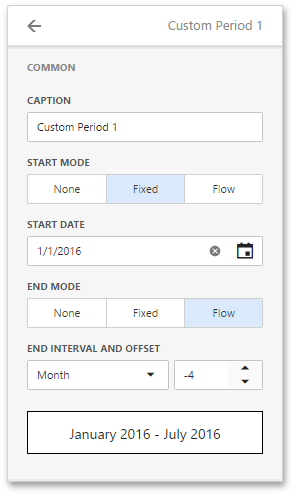
You can specify the following settings for the start/end boundaries.
- Caption - Specifies a predefined period caption.
- Start Mode - Specifies a mode of the start boundary.
- End Mode - Specifies a mode of the end boundary.
The following modes used to set predefined ranges are available.
- None - The selection will begin from the start/end of the visible range.
- Fixed - Allows you to select a specific date value using the calendar. Use the Start/End Date option to set a value.
-
Flow - Allows you to select a relative date value. The Interval option specifies the interval between the current date and the required date. The Offset option allows you to set the number of such intervals.
[!NOTE] Note that the Offset option can accept negative and positive values. Negative values correspond to dates before the current date, while positive values correspond to future dates.
Select Predefined Periods
To select a predefined period, click the Select Date Time Period button (the  icon) in the Range Filter’s caption and select the required period from the list.