Providing Maps
This topic describes how to use the default DevExpress Dashboard maps and configure their attributes.
Default Maps
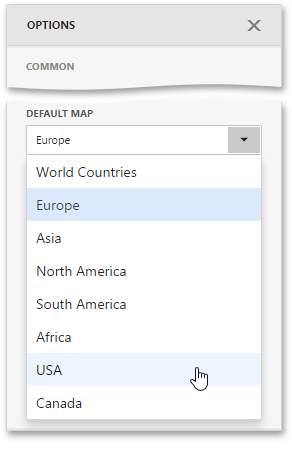
The DevExpress Dashboard ships with a set of default maps showing various parts of the world. The following maps are included.
- World Countries - a map of the world
- Europe - a map of Europe
- Asia - a map of Asia
- North America - a map of North America
- South America - a map of South America
- Africa - a map of Africa
- USA - a map of the USA
- Canada - a map of Canada
[!NOTE] The World Countries map has a lower level of detail than maps of specific regions and may not contain some of the countries. As an alternative, you can load a custom map with required granularity.
To select a required default map, go to the Options menu and use the Default Map dropdown list located in the Common section.
Custom Maps
The Web Dashboard uses a Shapefile vector format to provide custom maps. Commonly, this format includes two file types:
- .shp file - holds map shapes (points/lines/polygons)
- .dbf file - contains attributes for each shape.
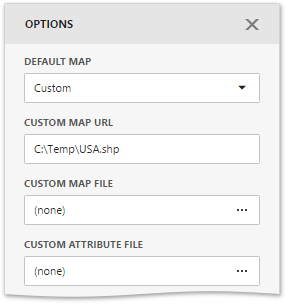
To provide a custom map, go to the Common section of the Options menu and change the Default Map value to Custom.
Finally, provide shape data using one of the following ways.
- Specify the path to the .shp file using the Custom Map URL option. Attributes from the corresponding .dbf file located in the same directory will automatically be included in the map.
- Load the existing shapefile using the ellipsis button next to the Custom Map File option. In the invoked dialog, locate the required .shp file. Use the Custom Attribute File option to locate the .dbf file containing attributes for each shape.
Note that custom maps created in the Cartesian coordinate system are not supported.