Printing and Exporting
The Dashboard allows you to print/export individual dashboard items, or the entire dashboard. See the Printing and Exporting topic to learn more about printing concepts common to all dashboard items.
This topic describes printing/exporting specifics for the Scatter Chart dashboard item.
Printing
You can customize the following options (via the Options button) before printing the Scatter Chart dashboard item using the Print Preview:
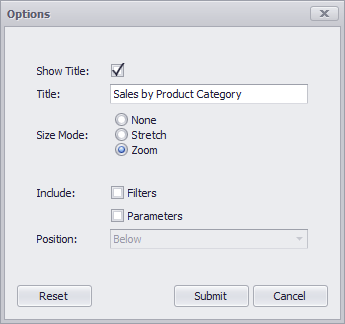
- Show Title - Specifies whether to apply the dashboard item caption to the printed document title.
- Title - Specifies the printed document title.
- Size Mode - Allows you to specify the Scatter Chart dashboard item’s print size mode.
-
**Include Filters** - Allows you to include master filter values to the printed document. -
**Include Parameters** - Allows you to include parameter values to the printed document. - Position - Specifies the master filter and parameter values’ position in the printed document. You can select from Below and Separate Page.
Specify the required options in the Options dialog and click the Submit button to apply the changes. Click the Reset button to reset changes to the default values.
Export To PDF
The following options are available when exporting the Chart dashboard item to a PDF:
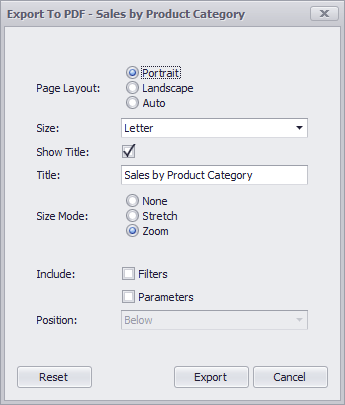
- Page Layout - Specifies the page orientation used when exporting a Scatter Chart dashboard item.
- Size - Specifies the standard paper size.
- Show Title - Specifies whether to apply the dashboard item caption to the exported document title.
- Title - Specifies the exported document’s title.
- Size Mode - Specifies the Scatter Chart dashboard item’s export size mode.
-
**Include Filters** - Allows you to include master filter values to the exported document. -
**Include Parameters** - Allows you to include parameter values to the exported document. - Position - Specifies the master filter and parameter values’ position in the exported document. You can select from Below and Separate Page.
Specify the required options in this dialog and click the Export button to export the Scatter Chart dashboard item. Click the Reset button to reset changes to the default values.
Export To Image
All data-bound dashboard items provide the same set of options when exporting them to an Image format. The following options are available:
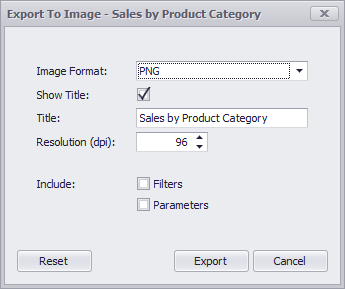
- Show Title - Specifies whether to apply the dashboard item caption to the exported document title.
- Title - Specifies of the exported document’s title.
- Image Format - Specifies the image format in which the dashboard item is exported.
- Resolution (dpi) - Specifies the resolution (in dpi) used to export the dashboard item.
-
**Include Filters** - Allows you to include master filter values to the exported document. -
**Include Parameters** - Allows you to include parameter values to the exported document. - Position - Specifies the master filter and parameter values’ position in the exported document. You can select between Below and Separate Page.
Specify the required options in this dialog and click the Export button to export the dashboard item. Click the Reset button to reset changes to the default values.
Export To Excel
Data visualized within all data-bound dashboard items can be exported to the required Excel format. The following options are available:
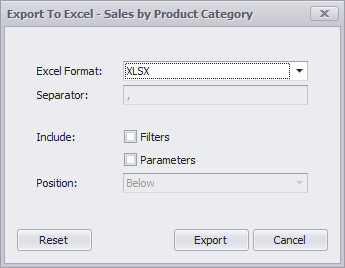
- Excel Format - Specifies the Excel format in which the dashboard item is exported. You can use the XLSX, XLS or CSV formats.
- Separator - Specifies the string used to separate values in the exported CSV document.
-
**Include Filters** - Allows you to include master filter values to the exported document. -
**Include Parameters** - Allows you to include parameter values to the exported document. - Position - Specifies the master filter and parameter values’ position in the exported document. You can select from Below and Separate Sheet.
Specify the required options in this dialog and click the Export button to export the dashboard item. Click the Reset button to reset changes to the default values.