Providing Data
This topic describes how to bind the Bubble Map dashboard item to data using the Dashboard Designer.
The Dashboard Designer allows you to bind various dashboard items to data in a virtually uniform manner (see Binding Dashboard Items to Data for details). The only difference is in the data sections that these dashboard items have.
The image below shows a sample Bubble Map dashboard item that is bound to data.
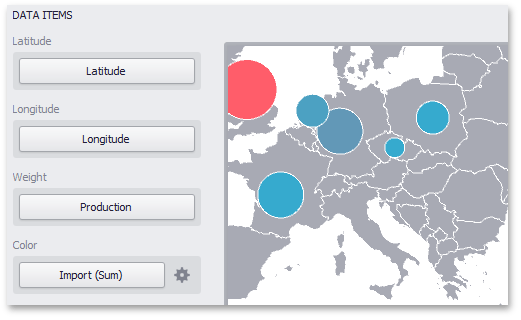
Note that the Bubble Map provides two data item groups for data binding: DATA ITEMS and TOOLTIP DATA ITEMS. Tables below list the available data sections.
DATA ITEMS
- Latitude - Accepts a dimension used to provide geographic latitude.
- Longitude - Accepts a dimension used to provide geographic longitude.
- Weight - Accepts a measure used to evaluate the bubble’s weight.
-
Color - Accepts a measure used to evaluate the bubble’s color.
The Bubble Map dashboard item automatically selects palette and scale settings used to color bubbles. To customize these settings, click the Options button next to the Color placeholder. This invokes the Color Scale Options dialog, which allows you to specify the palette and scale options. To learn how to use this dialog, see Coloring.
TOOLTIP DATA ITEMS
- Dimensions - Accepts dimensions allowing you to add supplementary content to the tooltips.
- Measures - Accepts measures allowing you to add summaries to the tooltips.