A Date Occurring
A Date Occurring format condition allows you to highlight date-time values that fall into a specified interval. Note that this format condition can be applied to dimensions with the continuous date-time group interval.
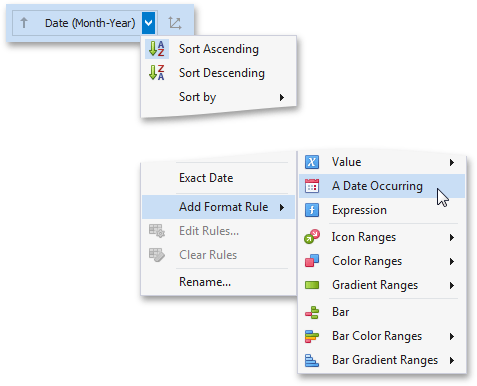
| To format values according the Date Occurring condition, click the menu button of the required dimension and select **Add Format Rule | A Date Occurring**. |
This invokes the A Date Occurring dialog that allows you to select a date-time interval(s) whose value should be formatted.
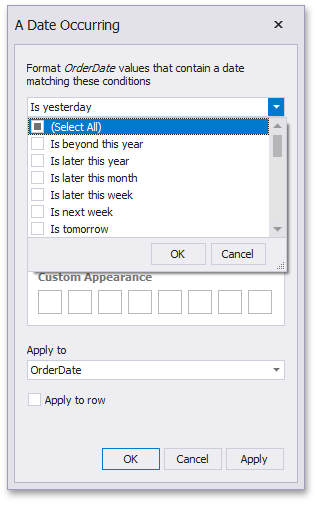
The following intervals are supported.
- Is beyond this year - Dates that follow the current year.
- Is later this year - Dates of the current year starting from the following month.
- Is later this month - Dates of the current month that follow the next week.
- Is later this week - Dates of the current week starting from the day after tomorrow.
- Is next week - Dates that belong to the following week.
- Is tomorrow - Tomorrow.
- Is today - Today.
- Is yesterday - Yesterday.
- Is earlier this week - Dates of the current week that are prior to yesterday.
- Is last week - Dates of the previous week.
- Is earlier this month - Dates of the current month that are prior to the previous week.
- Is earlier this year - Dates of the current year that are prior to the current month.
- Is prior to this year - Dates that are prior to the current year.
- Empty - Does not specify any condition.
- Beyond - Dates that belong to the month in three-months time and beyond.
- ThisWeek - Dates that belong to the current week.
- ThisMonth - Dates that belong to the current month.
- MonthAfter1 - Dates that belong to the following month.
- MonthAfter2 - Dates that belong to the month in two-months time.
- MonthAgo1 - Dates that belong to the previous month.
- MonthAgo2 - Dates that belong to the month two months ago.
- MonthAgo3 - Dates that belong to the month three months ago.
- MonthAgo4 - Dates that belong to the month four months ago.
- MonthAgo5 - Dates that belong to the month five months ago.
- MonthAgo6 - Dates that belong to the month six months ago.
- Earlier - Dates that belong to the month seven months ago and earlier.